


Real Estate Master IIIx Calc
4.740.00 Reviews
App Specs
- Version
- 10.4.13
- Updated On
- License
- Free
- Downloads
- 10,000+
- Developer
- Calculated Industries
- Categories
- Business
- Platform
- Android
Screenshots


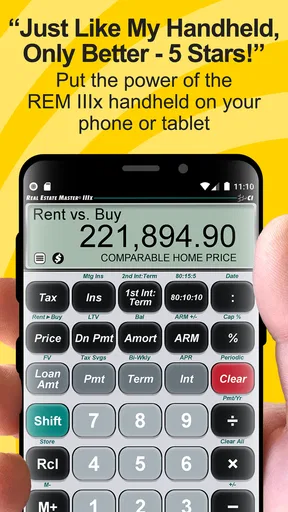
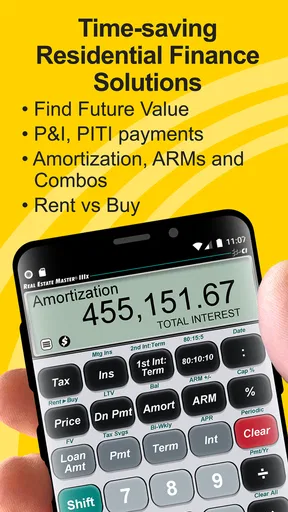
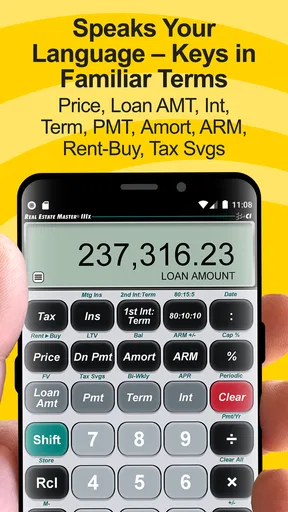


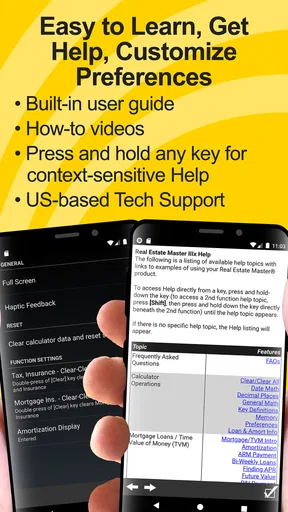
 Analysis by AppCompare
I approached Real Estate Master IIIx Calc as a working tool rather than a casual calculator. It is a business app from Calculated Industries aimed at residential real estate finance, so its value depends less on decoration and more on whether I can reach the right calculation quickly, enter figures confidently, and explain the result to another person. After using it in that context, my impression is that it is most useful for agents, loan professionals, and anyone who regularly has to discuss payments, financing, and property transactions without opening a full spreadsheet.
The app is free to install and is rated for Everyone, which makes it easy to try before committing to a workflow. It has a 4.7 average from around 239 ratings and more than 10K installs, a level of adoption that suggests it has found a focused audience rather than trying to be a general-purpose finance app. The current version is 10.4.13, and it runs on Android 6.0 or later. Optional purchases range from $0.49 to $24.99 per item, so I would check which functions are available in the free experience before making it part of a daily professional routine.
How clearly the calculator presents a real-estate workflow
The first thing I noticed is that this is not designed like a basic phone calculator. A standard calculator expects me to know the formula and remember what each number represents. This app is built around real-estate finance questions, which changes the way I think through a problem. Instead of treating a mortgage conversation as a series of unrelated arithmetic steps, I can approach it through familiar financial inputs and outputs.
That distinction matters when I am speaking with a buyer. A person may ask, “What would this home cost me each month?” The useful answer is rarely just one multiplication. It involves the loan amount, interest, term, payment frequency, and other assumptions. A specialized calculator gives me a better structure for checking those assumptions than a blank keypad does. I still need to understand the figures I enter, but I spend less time rebuilding the calculation from memory.
Navigation is easier when I already know the language of residential finance. If I am comfortable with terms such as principal, interest, down payment, and loan term, the app’s purpose is immediately clear. Someone new to mortgages may need a little patience, because a professional calculator can feel dense when compared with a simple monthly-payment tool. My advice is to learn one calculation at a time and keep a note of what each input means before using it in front of a client.
The display is best suited to focused work. I would not describe the experience as entertainment-oriented or visually spacious. It feels like a compact instrument designed to keep financial values close at hand. That can be an advantage on a property visit, where I want an answer without carrying a laptop, but it also means I have to slow down and verify the screen rather than tapping through casually.
The most important habit is to treat every result as an assumption-based estimate, not a promise. A calculator can process the numbers correctly while the numbers themselves are incomplete. When I use it with another person, I say what I included and what I left out. That simple explanation prevents a clean-looking figure from being mistaken for a formal loan quote.
Worth Reading Before You Choose

Flipboard Shows What News Apps Must Do Beyond the Feed

Switching to Android Auto Means Rethinking Your Driving Routine

Google Calendar Makes a Crowded Week Easier to Manage

Ludo King Makes the Most of the Minutes Between Plans

Baby Panda World Brings Quick Play to Modern Phones, but Its Game Library Feels Busy

ESPN’s Live Game View Makes Following Close Games Easier
Making the interface easier to read and follow
For readability, I get the best results when I use the app in a quiet setting and hold the phone at a comfortable distance. Real-estate calculations often involve several related values, so I avoid rushing from one field to the next. I read the label, enter the value, and then check the result before moving on. That process is slightly slower than using a familiar four-function calculator, but it reduces the chance of confusing a rate with a dollar amount or a monthly figure with a total.
People with lower vision may find a dedicated calculator more manageable than switching between a spreadsheet full of cells, a web page, and a notes app. At the same time, I would not assume that every label or control will be equally comfortable for every reader. The practical test is whether the text, contrast, and spacing work on the individual phone. Android’s own display and magnification options may help, but they do not change the underlying organization of the app.
I also recommend using the phone’s system text and display settings before deciding that the app does or does not suit you. A larger display, increased contrast, or screen magnification can make a meaningful difference during a long appointment. The trade-off is that enlarging everything may cause more scrolling or make a compact calculator feel less compact. In my experience, a moderate adjustment is more useful than immediately choosing the largest possible text.
For users who process information better through repetition, the app works well with a written checklist. I keep the property price, deposit, loan amount, rate, and term in a separate note, then enter them deliberately. This is not glamorous, but it creates a useful second layer of confirmation. It also makes the calculation easier to repeat when a client changes one assumption instead of asking me to start from scratch.
Motor control, touch accuracy, and sensory load
Any finance calculator depends on accurate touch input, and that creates a practical consideration for people with tremors, limited dexterity, or difficulty making small taps. A mistaken digit can produce a plausible-looking result, which is more dangerous than an obvious error. I therefore prefer to enter one value, pause, and visually confirm it before continuing. If I were working with someone who finds precise tapping difficult, I would give them time rather than taking over the device without asking.
A phone with a larger screen can make the controls easier to target, although I would not treat screen size as a guarantee of comfortable use. A stylus may help some users, while others may prefer Android’s voice input for entering figures where the device supports it. Voice entry deserves extra checking because spoken numbers, decimal points, and percentage values can be interpreted incorrectly. I would never rely on voice input alone for a client-facing financial calculation.
Sensory load is another factor. Property and lending conversations can be noisy, rushed, and socially demanding. A compact calculation tool is helpful because it avoids the distraction of opening a browser and searching for a suitable mortgage calculator. However, the app does not remove the pressure of the situation. If I am standing in a busy viewing, I would rather step aside, enter the figures carefully, and explain the result afterward than calculate while several people are talking over me.
Users who are sensitive to visual clutter may appreciate the focused purpose, but users who need extensive guidance may find a professional calculator less welcoming than a teaching-oriented finance app. That is an important distinction. This tool supports calculation; it does not replace financial education. I would pair it with plain-language explanations when working with a first-time buyer or anyone unfamiliar with loan terminology.
Using it in different places and under different pressures
The strongest everyday use case for me is a quick conversation after a client changes a property budget. Suppose a buyer sees a home at a different price from the one we discussed earlier. I can update the relevant inputs and compare the effect on the financing picture without opening a computer. The benefit is not merely speed. It is the ability to keep the conversation connected to the buyer’s actual question instead of postponing every answer until I return to the office.
Another useful situation is preparing for a meeting. I can work through a few scenarios before speaking with a client, such as changing the deposit or comparing different loan terms. I would record the assumptions beside each result, because a number without its assumptions is difficult to interpret later. This workflow is more reliable than saving a screenshot with no explanation, especially when several properties are being discussed.
The app is also suitable for independent agents who do not want to maintain a spreadsheet for every quick estimate. A spreadsheet offers more flexibility, but it requires a template, careful cell labeling, and protection against accidental edits. A general online calculator is faster for a single simple question, yet it can force me to move between separate tools when I want to examine several related financing figures. The specialized approach sits between those alternatives: more purposeful than a basic calculator, less customizable than a spreadsheet.
Situational access matters for people who share devices, work in the field, or have limited access to a desktop. Because the app is available on Android devices running version 6.0 or later, it can fit older phones that would not be ideal for a modern web-heavy workflow. I would still test it on the actual device, especially if the phone has a small screen or relies on system accessibility settings.
For iPhone users, this specific Android app is not the natural choice. I would look for a comparable iOS calculator from the same specialist category rather than planning a workflow around an Android-only installation. That is not a criticism of the calculation model; it is simply an important platform decision. A team should also agree on how results are recorded if some members use Android and others use iOS.
Where the experience still creates barriers
The biggest barrier is financial confidence. A person can be able to read the screen and operate the controls yet still struggle to know which values belong in which fields. That is especially true when a buyer asks about a real loan and expects a definite answer. I would not recommend handing the app to someone with no mortgage knowledge and assuming the interface will teach them everything they need.
There is also a professional communication barrier. A result shown on a phone may look authoritative, even when it is only a scenario. I make a point of naming the assumptions aloud and separating an estimate from lender-specific terms. If a client needs an official affordability decision, documentation, or a complete cost review, this calculator should be one small part of the conversation rather than the final authority.
The optional purchase model may also require attention. The app itself is free, but individual items can cost between $0.49 and $24.99. For a casual user who only needs occasional calculations, that may be acceptable. For a professional, the better question is whether the functions needed for regular work are included in the free experience or require separate purchases. I would answer that before recommending it to an entire office or building it into a client-service process.
Another limitation is that a focused calculator is not a complete property-finance workspace. I would not choose it as a replacement for document storage, client management, loan comparison records, or a full spreadsheet model. It is strongest at the moment when I need to calculate or discuss a financing scenario. It is weaker as a central place to preserve the broader context around that scenario.
People who need extensive visual customization, highly guided education, or a completely hands-free workflow may prefer another option. A simple web calculator may be less intimidating for a first question, while a spreadsheet may be better for detailed analysis and long-term record keeping. The right choice depends on whether the priority is speed in a conversation, teaching, or control over a larger financial model.
My inclusive verdict for real-world use
I see Real Estate Master IIIx Calc as a practical specialist tool for people who already understand the basics of residential finance and want a portable way to work through scenarios. Calculated Industries has kept the focus on professional real-estate calculation rather than turning the app into a broad personal-finance package. That focus is its main strength, particularly for agents and loan professionals who need something more relevant than the calculator already built into a phone.
Its accessibility is best understood in terms of context rather than a simple yes-or-no label. Someone with good financial familiarity may find the focused layout efficient. Someone with low vision may benefit from a larger device and Android display adjustments. Someone with motor difficulties may need slower entry, larger touch targets, or an alternative input method. Someone under sensory or social pressure may need a quiet pause before trusting the result. Those are real differences in use, and I would test the app with the person and device involved rather than making assumptions.
The app’s Everyone content rating and free starting price make experimentation straightforward, while the optional purchases mean professional users should review the cost of the exact tools they need. Its 4.7 average and 10K-plus installs make it a credible candidate for a trial, but neither figure replaces personal testing. I would install it, recreate a few familiar scenarios, and compare the results with my existing method before using it in a high-stakes meeting.
My recommendation is strongest for an Android-based real-estate professional who wants quick, structured calculations during preparation or client conversations. I would recommend a general calculator or a simpler educational app to someone who only needs one basic payment estimate, and a spreadsheet or dedicated financial software package to someone managing detailed records and many scenarios. For the right user, this app can make a mobile device feel like a useful professional instrument. For everyone else, its specialist language and input demands may outweigh that convenience.
Pros
- Covers a broad range of real estate calculations in one compact tool.
- Useful for quickly checking figures during property analysis or client meetings.
- Helps reduce manual formula errors when entering financial data.
- Practical for investors
- agents
- lenders
- and property professionals.
- Designed for focused calculations without unnecessary social or entertainment features.
Cons
- The interface may feel dated compared with newer finance apps.
- Users need real estate knowledge to interpret some calculated results.
- Limited usefulness for people who only need basic mortgage estimates.
- Manual data entry can still lead to inaccurate results if inputs are wrong.
- Some advanced features may require time to learn and configure properly.
FAQs for Real Estate Master IIIx Calc
What is Real Estate Master IIIx Calc used for?
Real Estate Master IIIx Calc is a specialized financial calculator for real estate professionals, investors, students, and anyone analyzing property deals. It is designed to help with calculations such as loan payments, cash flow, investment returns, property valuation, and other real estate finance scenarios. It is more practical for detailed analysis than a standard calculator, although beginners may need time to understand the terminology and available functions.
Is Real Estate Master IIIx Calc suitable for beginners?
The app can be useful for beginners, but it is primarily aimed at users who already understand basic real estate and financial concepts. Its calculator-style interface may feel technical at first, especially when entering variables for mortgages, investment returns, or property analysis. New users should review the included instructions or learn the relevant formulas before relying on the results for an actual purchase, loan decision, or investment strategy.
What types of real estate calculations can be performed with the app?
Real Estate Master IIIx Calc focuses on common property-investment and financing calculations. Depending on the selected calculator, users may be able to estimate mortgage payments, loan balances, cash flow, capitalization rates, investment performance, depreciation, and other real estate metrics. The exact tools can vary by version and platform, so users should check the app’s current feature listing before downloading if they need a specific calculation.
Can the results from Real Estate Master IIIx Calc be trusted for financial decisions?
The app can provide helpful estimates when the entered information and assumptions are accurate, but its results should not be treated as professional financial, tax, legal, or investment advice. Real estate calculations depend on details such as interest rates, fees, taxes, insurance, vacancy, maintenance, and local regulations. Always verify important figures independently and consult a qualified professional before making a major property or financing decision.
Does Real Estate Master IIIx Calc require an internet connection or collect personal data?
A calculator app of this type will generally allow core calculations to be performed offline, which is convenient when reviewing properties or working without reliable mobile service. However, requirements can differ between Android and iOS versions, particularly for advertisements, updates, analytics, or optional online features. Before installation, review the app-store permissions and privacy information to understand what data may be collected and whether any features require connectivity.


